Digital QR menus & dine-in ordering for your brand
Nasj Menu brings your QR menu, dine-in orders, waiter calls, reservations, and analytics into one polished workspace for growing brands.
Already have a menu? Bring your own menu in from a link to its page, a copy of that page saved from your browser, a photo of your paper menu, or an Excel file, in Arabic and English.
How menu import works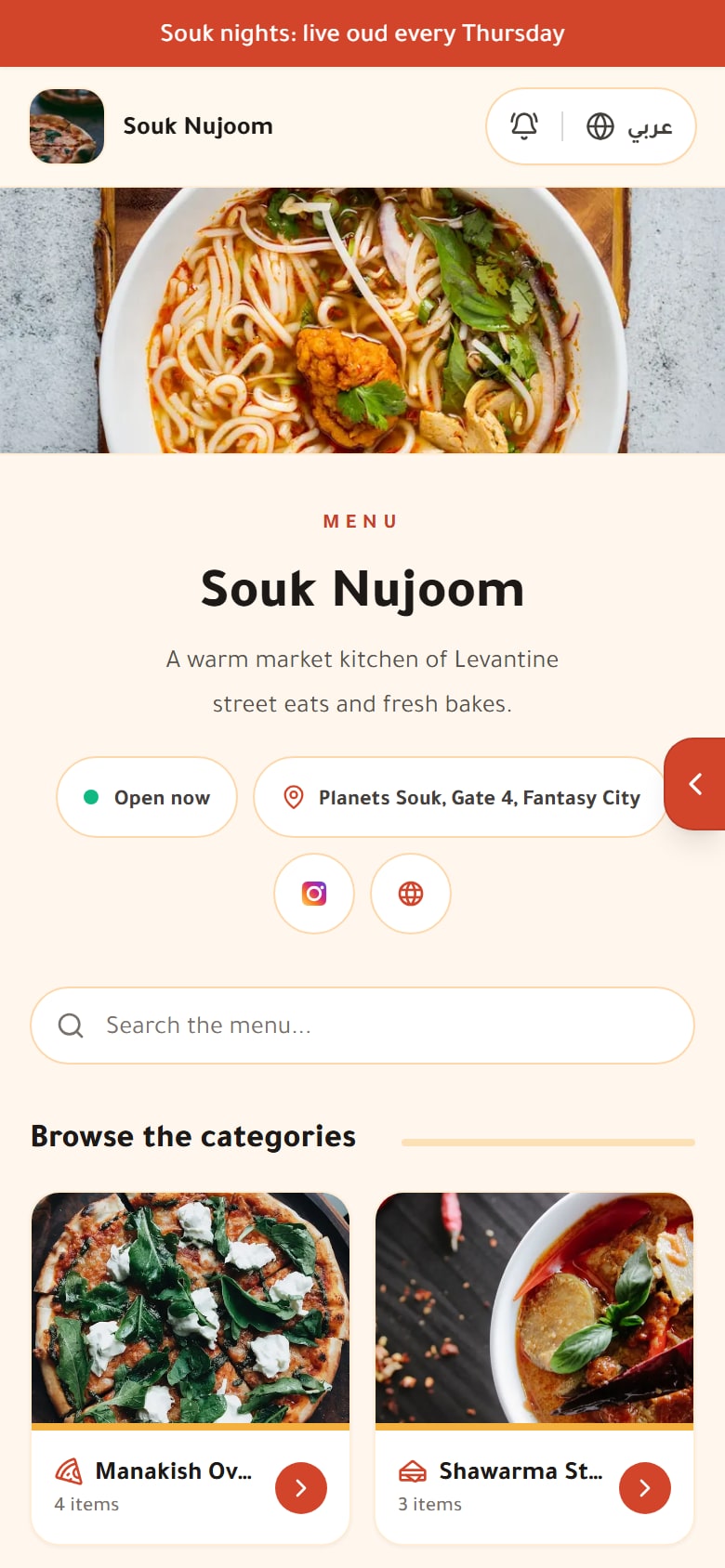
Built for restaurants in Saudi Arabia
A clear menu for your guests. An easier way for your team to keep up with daily service.
Arabic and English
Natural reading in both directions, with two menu languages on paid plans.
The nutrition fields SFDA asks for
Calories and allergens on every dish, a table to fill many dishes at once and an allergen filter for guests; you enter the values and check their accuracy.
Menu looks in your identity
The free plan uses the Classic look; paid plans add more, up to all 10 on Pro and Enterprise. Try each one on a live menu before choosing.
New orders, in view
Sound alerts and notices for new orders while your dashboard is open. Follow them in one place.
More than a menu. One platform for the whole table.
From the first scan to the waiter call, every order runs through one system you control.
Menu builder
Design beautiful, photo-rich menus with categories, modifiers, allergens and prices — saved changes show the next time a guest opens the menu, no reprints.
QR ordering
One QR per table takes guests to ordering. They browse, customize, and send the order to your staff — nobody has to come and take it, and there is no app to install.
Orders & service
Guests order and call a waiter from the table; staff work the queue from any device. Guests pay the restaurant directly, as usual — Nasj Menu never takes payments from guests.
Insights & branches
See best-sellers, peak hours and revenue for each branch, and compare with the previous period or the same Hijri dates last year. Switch to any branch from the same dashboard to see its own numbers.
The guest experience
From the first scan to a clear order for your team
Guests see dishes, prices and options on their own phones, and place dine-in orders when ordering is enabled.
Browse and understand
Categories, search and photos, with the calorie and allergen information the restaurant provides.
Make it your own
Clear sizes, extras and required choices, with the price shown before adding a dish.
Review, then send
A cart, table number and order tracking. Guests pay the restaurant directly using its usual methods.
Reservations, waiter calls and other controls appear according to restaurant settings and the plan.
Read the guest experience guide
During service
From the table to the kitchen, on one screen
Orders, waiter calls and today's bookings meet on a service screen built for the counter, the kitchen and the floor. Your team sees what has waited longest and changes an order when a guest changes their mind.
Live service screen
Front, kitchen and floor stations, waiting times that turn amber after 10 minutes and red after 20, one chime, and a kiosk mode for a counter or kitchen tablet.
Edit orders after they are sent
Add, change or remove dishes. The total is recalculated, and the kitchen ticket shows what was added or changed.
Reservations by the day
On paid plans: booking requests from your menu, plus phone and walk-in bookings. Confirm, check in, mark no-shows and assign tables.
Sold out and daily limits
Take a dish off one branch's menu on any plan, or, on paid plans, cap how many sell today. Everything comes back at the hour your new day starts.

Reviews
Hear from guests after every order
Guests rate their order from the menu, the feedback reaches you privately, and you decide what to publish.
Feedback after the order
Stars, a like or dislike for each dish and an optional comment. Ratings of 3 stars or less are flagged for follow-up.
“Guest favourite” badge
An optional badge on up to 5 dishes that guests clearly like, earned from their ratings.
A Google invite at every score
On paid plans, every guest is invited to review you on Google, whatever their rating. Unhappy guests are never filtered out, which Google's policy does not allow.
Public replies
Publish the feedback you choose on your menu and answer it; your reply appears under the review.

As you grow
Branches, brands and a team with the right access
Add what a bigger operation needs without moving to another system.
Chains and brands
One menu for every branch with branch prices, and guests can switch branch from the menu. A brand page lists all your branches.
Brand page: Starter and up. Locations included in total across your account (main + branches): Pro 3 and Enterprise 10, then 19 SAR a month per extra location
Team permissions
Invite managers, staff and waiters with their role's access, then, on plans with per-area permissions, give View or Manage access across 12 areas, from the menu and orders to reviews and analytics. Billing, the team and backups stay with the owner.
Team invites on every plan. Per-area permissions: Pro and Enterprise
Also included
Your data, kept safe
Manual backups on every plan, optional daily backups on paid plans (kept up to your plan's limit), menu export to Excel and back, a full account export and two-step sign-in.
Announcements and offers
On paid plans, an announcement bar and a promo popup with a title, text and image in both languages, for a Ramadan offer or a new dish.
A QR for the counter too
A general QR lets walk-in guests build a list to show the cashier, and guests can scan their table's code from inside the menu to order there.
“How many of you?”
An optional question in the cart, shown on the orders board and used for spend per person.
Email notifications
New orders and reviews reach you by email; guests who book get a confirmation with a cancel link, then status updates.
Fast photos
Every upload is resized and optimised automatically, with location data removed, so the menu opens quickly on mobile data.
Built for owners and managers — not just diners
Your guests order from a beautiful menu. You get a clear back office: incoming orders, sales, and each branch one switch away.

Real product screens with demonstration data. Available controls depend on restaurant settings and the plan.
Owner guide: from setup to daily serviceLive in three simple steps
Bring in your menu, share its QR code and enable the service tools your restaurant needs. Guests start in their phone browser.
- 01
Bring in your menu
Paste the link to your current menu page, upload a copy of it saved from your browser, take a photo of your paper menu, or upload an Excel file. Both languages are handled and you review every dish before saving, or build the menu from scratch.
How menu import works - 02
Print your QR
Get a table-ready QR code and a shareable link, styled to match your brand on paid plans.
- 03
Start serving
Guests scan, browse, and order. Your team follows every order on the orders board or the live service screen, and you see visits in your analytics.
Each feature in detail
How it works, what you and your guests see, and the limits worth knowing.

Add products & options
Build menu sections and items with Arabic and English names, photos, prices, sizes, extras and availability. Start manually or import your existing menu.

Connect your domain
Use your restaurant's domain for its digital menu: check the address in settings, add two DNS records, verify, and HTTPS is set up for you.

Guest allergen filters
Let guests filter the digital menu by recorded allergens, read dish labels and ask staff about preparation. Control labels and filters from menu settings.

Design your QR code
Design table QR cards with your logo, fonts, text and colours, start from ready designs, and print every table's card on one sheet. Test before service.

Call the waiter
Guests request table service from the digital menu with an optional note. Staff follow up in the dashboard; the service switch is separate from ordering.
Digital QR menu
A bilingual Arabic and English QR menu: up to 10 templates by plan, dish photos, options, calories and allergens. Opens on any phone, no app needed.

Ordering from the table
Guests scan their table's QR code, order with options and call a waiter. New orders arrive within seconds with a sound alert and the table number.

SFDA menu labelling
Show calories, allergens, caffeine and a high-salt flag on your QR and printed menu, and see which dishes still miss data in one report.
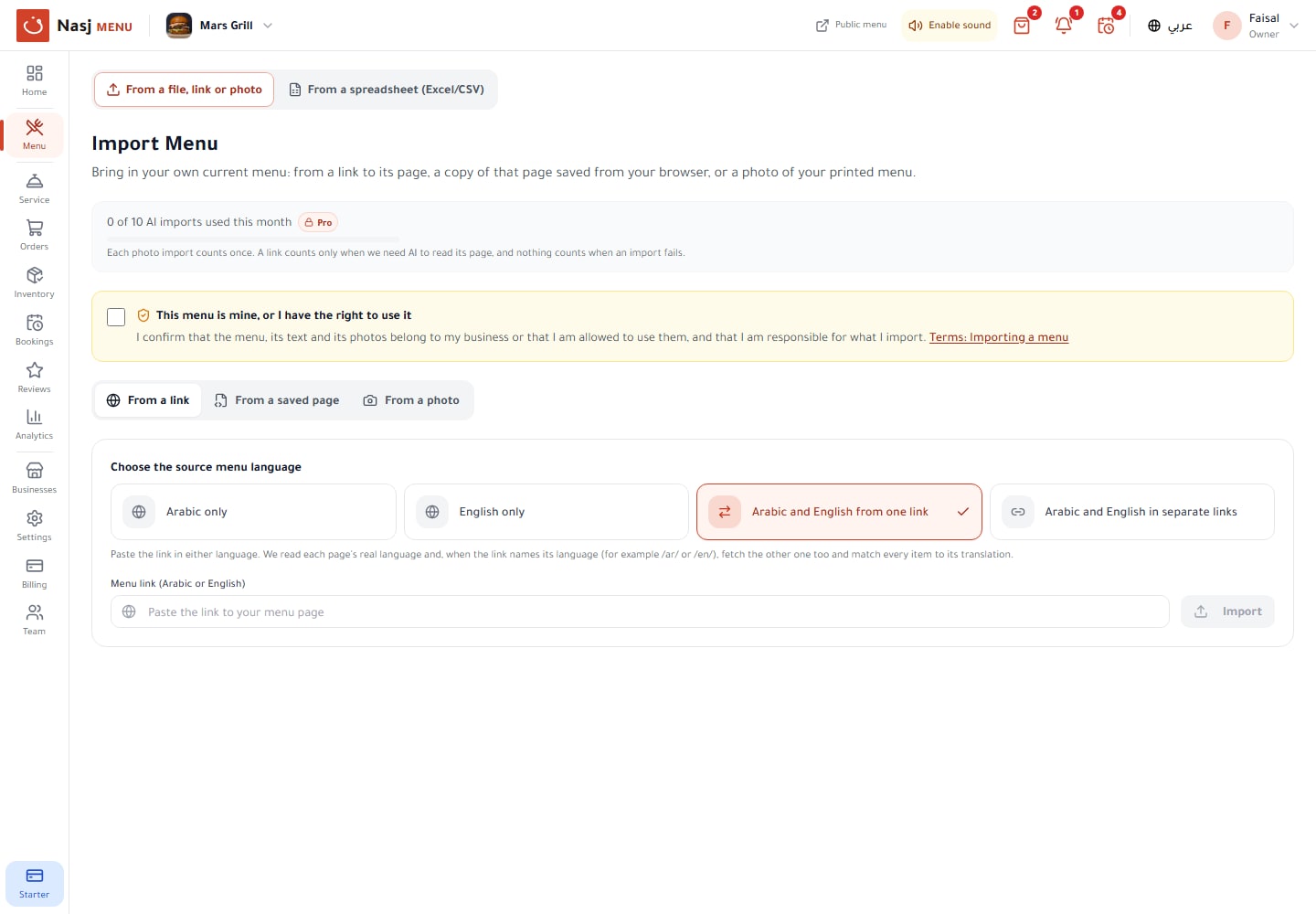
Import your menu
Bring your own menu into Nasj Menu from your menu page's link, a saved copy of that page or a photo of your paper menu. Review every dish before saving.

Menu analytics
Orders, revenue and busy hours, Hijri-date comparisons, each dish's journey, a profit matrix, dishes ordered together and service speed, per location.
Guest feedback & Google reviews
Ask every guest for feedback after their order, follow up on low scores privately, and invite every guest to review you on Google, whatever their score.

Printed menu (PDF)
Design a printed menu from your digital one: 20 templates, Arabic, English or bilingual, single page, spread or booklet, with your QR code. Export a PDF.

Branches & brands
Run all your branches from one account: a shared menu with branch prices, each branch's own orders and sold-out items, a brand page and team permissions.
Live service & kitchen screen
One screen for the counter, the kitchen and the floor: new orders, waiting times, waiter calls and today's bookings, on a tablet or computer.

Table reservations
Guests request a table from your menu; you confirm, check in or mark no-shows by day, add phone bookings and assign tables, with emails to the guest.

Sold-out items & daily limits
Mark a dish sold out at one branch or cap how many sell each day. Guests stop seeing it, and everything comes back on its own at the hour you choose.

Team roles & permissions
Invite managers, staff and waiters by email and choose what each can view or manage across 12 areas. Billing, the team and backups stay with the owner.
Simple, Transparent Pricing
Start free and upgrade as you grow. Pay monthly or yearly, and keep your plan to the end of the period you paid for.
Free
A QR menu with ordering from the table, free with no time limit.
Free, no time limit
- 1 location (the main one, no branches)
- 20 menu items
- QR ordering for 5 tables
- Waiter calls and the live service screen
- 2 team members
- Analytics for up to 30 days and the weekly email
- Nasj Menu branding
Starter
For one restaurant that takes bookings, gathers reviews and shows its own brand.
- 1 restaurant
- 100 menu items
- Up to 3 locations in total (main + branches)
- 25 tables and 5 team members
- Table bookings and Google review funnel
- Custom QR code
- Item, profit and service-speed analytics
- Daily automatic backups
- Arabic and English menu
- Remove Nasj Menu branding once paid
No credit card required
Pro
For restaurants with several branches: your own domain and team permissions.
- 3 restaurants
- 3 locations included (main + branches), +19 SAR/mo each extra
- Unlimited items
- 100 tables and 15 team members
- Per-area team permissions
- All 10 menu templates
- Custom domain
- Priority support: a reply within 1 business day
- All Starter features
No credit card required
Enterprise
For larger restaurants and groups that need more capacity and control.
- 10 restaurants (more: contact us)
- 10 locations included (main + branches), +19 SAR/mo each extra
- Unlimited items
- Unlimited tables and team members
- All Pro features
No credit card required
Ready to Go Digital?
Use Nasj Menu to turn every table into a faster, clearer, more polished guest experience.